I deployed a fullstack portfolio to Vercel. Next.js client, Express API, MongoDB Atlas, image uploads in the admin panel. It had worked on my laptop for weeks, which I had mistaken for evidence.
Every bug I hit had one thing in common, and it took me a while to notice it. None of them could happen locally. Not "hard to reproduce locally". Impossible, because my machine quietly provides three things serverless does not:
A filesystem you can write to.
A process that boots, then lives for a while.
Nobody deciding in advance whether a page is static or dynamic.
Remove those and a working app breaks in ways that mostly do not tell you. Here is each one.
1. The disk is read-only and it does not complain
My upload handler wrote files to disk and served them back with express.static. No account anywhere, no SDK, about six lines. I was pleased with it.
On a serverless host the filesystem is read-only except for /tmp, and /tmp belongs to one invocation. It is a desk on a train. You can put things on it, briefly.
The bad case is not the crash. The bad case is when the write lands in a directory that vanishes with the function. The API returns 201. The admin form shows a lovely preview, because the browser still has the file in memory and knows nothing of your infrastructure. The record saves. Everyone involved is satisfied.
Then the URL is a 404 forever, and nothing anywhere mentions it. I found out the way you always find out, which is by opening my own site a few days later and seeing a broken image where my face should have been.
The fix is to pick the storage driver based on whether its credential exists, rather than on a flag someone has to remember:
export function isBlobStorageEnabled(): boolean {
  return Boolean(process.env.BLOB_READ_WRITE_TOKEN);
}
Vercel sets BLOB_READ_WRITE_TOKEN when you link a Blob store, so its presence is the configuration. There is no second switch, and no way to end up in the state where the app believes blob storage is on but has no token. Those are now the same fact.
The other half is refusing to fail mysteriously. If the code reaches the disk branch while running on Vercel, the deployment is misconfigured and should say so:
if (process.env.VERCEL) {
  throw new Error(
    'File uploads need blob storage on Vercel: link a Blob store so ' +
    'BLOB_READ_WRITE_TOKEN is set. The filesystem is read-only, so ' +
    'there is nowhere to put the file.',
  );
}
An EROFS stack trace reads like a code bug and sends you into the upload handler with a debugger. That sentence sends you to a dashboard. Error messages are documentation for someone who has forgotten everything, and that someone is you, in four months.
2. The helper that ate my hostnames
This one cost the most time and was entirely my own doing.
The API stores its own uploads as relative paths, /uploads/file.png, so the origin can change without a database migration. Reads turn them back into absolute URLs. Two small helpers. The write side did this:
// Strip from the first /uploads/ we find.
const idx = value.indexOf('/uploads/');
return idx >= 0 ? value.slice(idx) : value;
Fine for local files. Less fine once a Vercel Blob URL shows up, because it looks like this:
https://{store-id}.public.blob.vercel-storage.com/uploads/file.pngSpot the /uploads/. So my helper took a perfectly good absolute URL, sliced off everything before that, and threw away the only host in the world where the file existed. Uploaded, previewed, saved, gone. Same symptom as problem one, completely unrelated cause, which is a fun thing to discover when you think you have already fixed this.
The fix is to only strip when the URL is actually ours:
if (/^https?:\/\//i.test(value)) {
  const base = getConfig().SERVER_BASE_URL.replace(/\/+$/, '');
  // Absolute, but not ours: blob storage, a CDN, a seeded image. Keep it.
  if (!value.startsWith(`${base}/uploads/`)) return value;
  return value.slice(base.length);
}
What I had written was a substring search wearing the costume of an ownership check. indexOf('/uploads/') asks whether a string contains some characters. The question I meant to ask was whether the URL is on my origin. Those two agree right up until a second host appears, and adding object storage is precisely the act of adding a second host.
3. Do not believe anything the request tells you
Since I was in there anyway. Multer's fileFilter checking file.mimetype.startsWith('image/') feels like validation. It is not. Both mimetype and originalname are set by whoever is uploading. A request can say image/png and send a PHP file, or say text/html and get that content type served straight back at visitors from your storage domain.
So the extension and content type come from the bytes:
if (buffer[0] === 0x89 && buffer.toString('ascii', 1, 4) === 'PNG') {
  return { ext: 'png', mime: 'image/png' };
}
if (buffer[0] === 0xff && buffer[1] === 0xd8 && buffer[2] === 0xff) {
  return { ext: 'jpg', mime: 'image/jpeg' };
}
The stored name is a UUID plus whatever extension the bytes earned. Nothing the client sent survives into anything stored or served.
SVG is deliberately not on the list. SVG is an image the way a Word document is a picture of text: technically yes, in practice it is a document, and it can contain a <script> tag. Serve one from a storage host on its own URL and that script runs when somebody opens it. A JPEG cannot do that. Accepting SVG uploads is accepting arbitrary scripts hosted on a domain you own, which is a bigger decision than the file picker makes it look.
4. The 4.5MB ceiling that is nowhere in your code
A Vercel Function's request body is capped at 4.5MB by the infrastructure. No application setting raises it. So my limit is 4, not 5:
MAX_UPLOAD_SIZE_MB: z.coerce.number().default(4),Sitting under the ceiling instead of on it decides whose error the user sees. Under it, multer rejects the file and the form can say "too large, limit is 4MB". At or over it, the platform kills the request before my code exists and returns FUNCTION_PAYLOAD_TOO_LARGE, which the client cannot explain to anyone.
Behind nginx this number is just client_max_body_size and you can raise it as much as you like. That asymmetry needs a comment next to the value, because otherwise "4" looks like a preference and someone will helpfully round it up. That someone is also you.
5. There is no boot, so nothing can happen at boot
Locally my server seeds an admin account on startup. Serverless does not start up. It wakes briefly, with no memory of having been alive, and doing the seed on every cold start would put a database round trip in front of requests that did not ask for one.
So it is a command you run once:
cd server && MONGODB_URI='...' JWT_SECRET='...' \
  ADMIN_EMAIL='...' ADMIN_PASSWORD='...' npm run seed:admin
The nastier version of this is module scope. A static import of the Express app drags the config schema in during function initialisation, so one malformed environment variable throws before any handler exists. Vercel reports that as FUNCTION_INVOCATION_FAILED with nothing useful in the body. The real reason is in the runtime log, assuming you know to go and look, which I did not for an embarrassing length of time.
Importing inside the handler moves the failure into a request, where it can be caught and answered:
export default async function handler(req, res) {
  try {
    const [appModule, dbModule] = await Promise.all([
      import('../src/app.js'),
      import('../src/config/db.js'),
    ]);
    if (!cachedApp) cachedApp = appModule.createApp();
  } catch (error) {
    // Names only, never values: every variable in a config error is a secret.
    fail(503, error instanceof Error ? error.message : 'Server misconfigured');
    return;
  }
  // ...
}
A 503 that names the wrong variable beats a 500 that names nothing at all.
6. One origin, because of one cookie
The client and the API are two separate Vercel projects, but the browser only ever sees one origin.
The client rewrites /api/* across to the API.
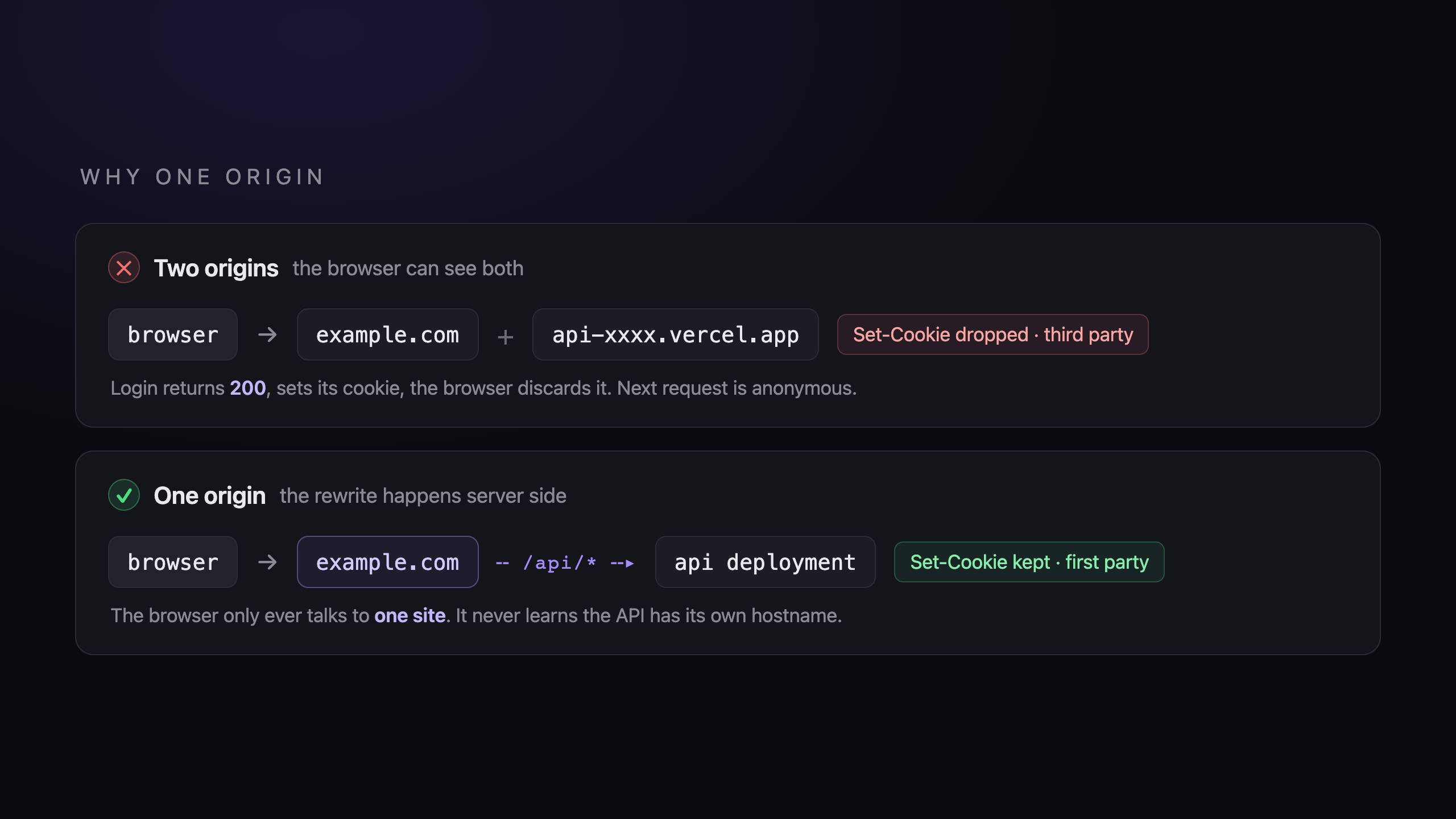
This is not tidiness. A browser treats a cookie from a different site as third party and drops it. So with a cross domain API, the admin login returns 200, sets its cookie, the cookie is discarded on arrival, and the next request is anonymous. You get signed out by a login that reported success. Every individual component worked correctly, which is the most annoying category of bug there is.
Two consequences worth knowing:
NEXT_PUBLIC_API_URLis/api, relative on purpose, so the rewrite catches it.Server side rendering cannot use a relative URL, because
fetchin Node has no page to resolve it against. So a separateAPI_ORIGINnames the API absolutely, for the server side only.
The rewrite reads that variable instead of hardcoding the hostname, because vercel.json cannot interpolate environment variables. Put the API domain in there and changing it becomes a code change and a commit, for a value that belongs in a dashboard:
async rewrites() {
  if (!apiOrigin) return [];
  return [{ source: '/api/:path*', destination: `${apiOrigin}/api/:path*` }];
}
7. next/image trusts nobody
Once uploads live on a storage host, every thumbnail is a remote image, and next/image will not optimise a host you have not allowlisted. Each Blob store gets its own subdomain, so you cannot hardcode the id:
images: {
  remotePatterns: [
    { protocol: 'https', hostname: '**.public.blob.vercel-storage.com' },
  ],
}
Miss it and your first uploaded image renders as a "hostname is not configured" error, which looks exactly like a broken upload and sends you back to debugging storage. That is the third bug in this list whose symptom is a broken image and whose cause has nothing to do with images.
8. Everyone shares one IP address
Requests arrive through Vercel's proxy, so unless you tell Express to trust it, req.ip is the proxy's address for every visitor on earth. Per IP rate limits then quietly become global ones, and the contact form's generous "5 per hour per IP" is 5 per hour for the internet.
TRUST_PROXY_HOPS=1It defaults to 0, which is correct for a directly exposed server, and trusting a proxy that is not actually there lets anyone forge an address and skip the limits entirely. So the right value depends on the deployment rather than the app, which is exactly why it has to be configuration and not a constant.
9. Static or dynamic is decided at build, and getting it wrong takes out the whole route
This one arrived after I thought I was finished, and it is the purest example of a bug that cannot exist locally.
The case study page had a generateStaticParams, which registers every published slug for static generation. It also read its data with cache: 'no-store', because posts are edited through the API and nothing calls revalidateTag, so a cached copy would never refresh.
Two bits of code, about forty lines apart, disagreeing about whether this page can be built ahead of time. The platform starts generating, the uncacheable fetch stops it, and the render dies with "Page changed from static to dynamic at runtime". Because that fails at the route level, every path under the segment falls through to the prebuilt error page. Including the ones that should have been 404s, so a request for a project that did not exist returned a 500, which is its own small insult.
Locally, nothing. next build shrugs, classifies the route as dynamic and carries on. The contradiction only exists when something actually attempts the generation.
The fix is to stop claiming the page can be prerendered:
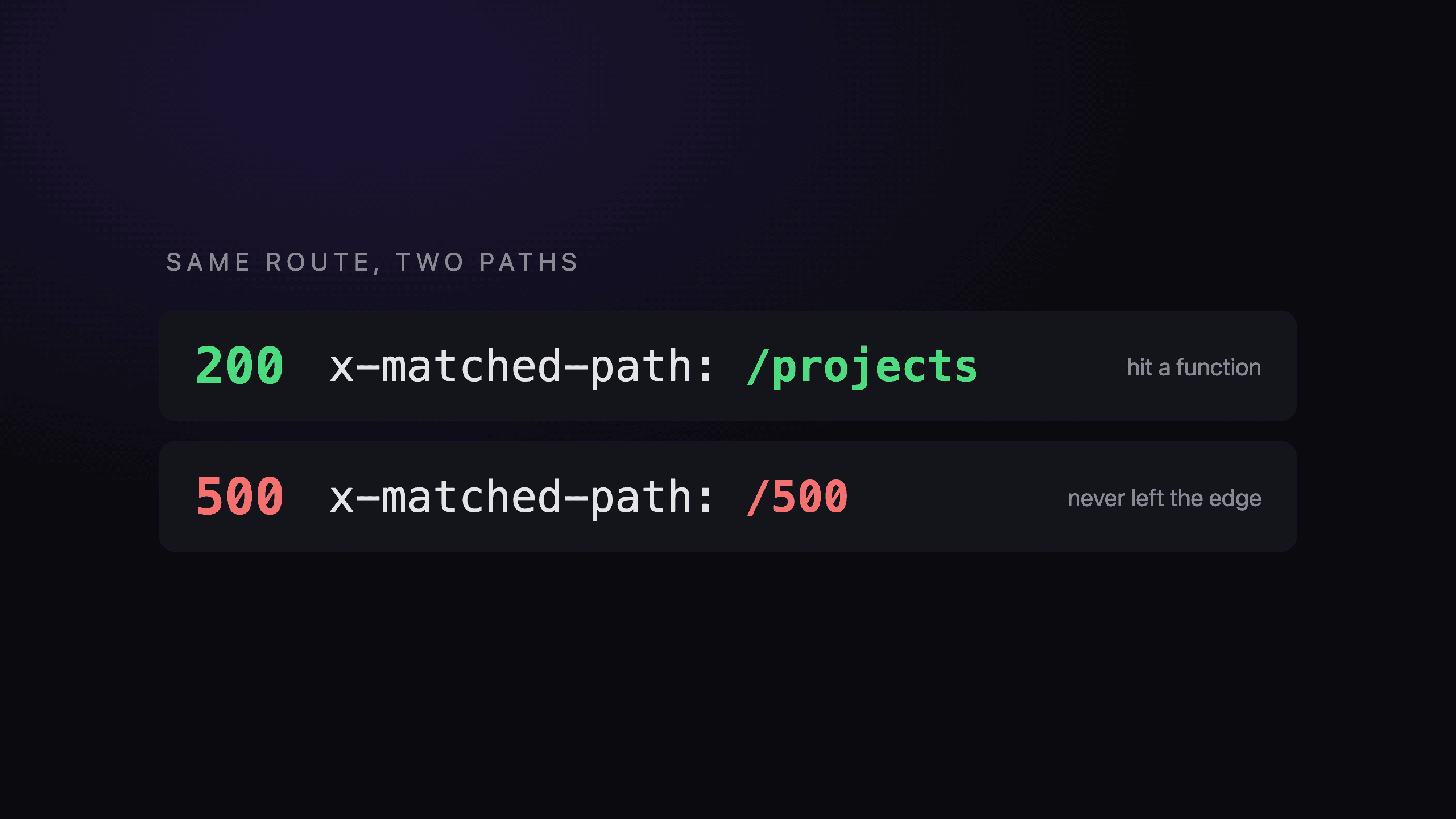
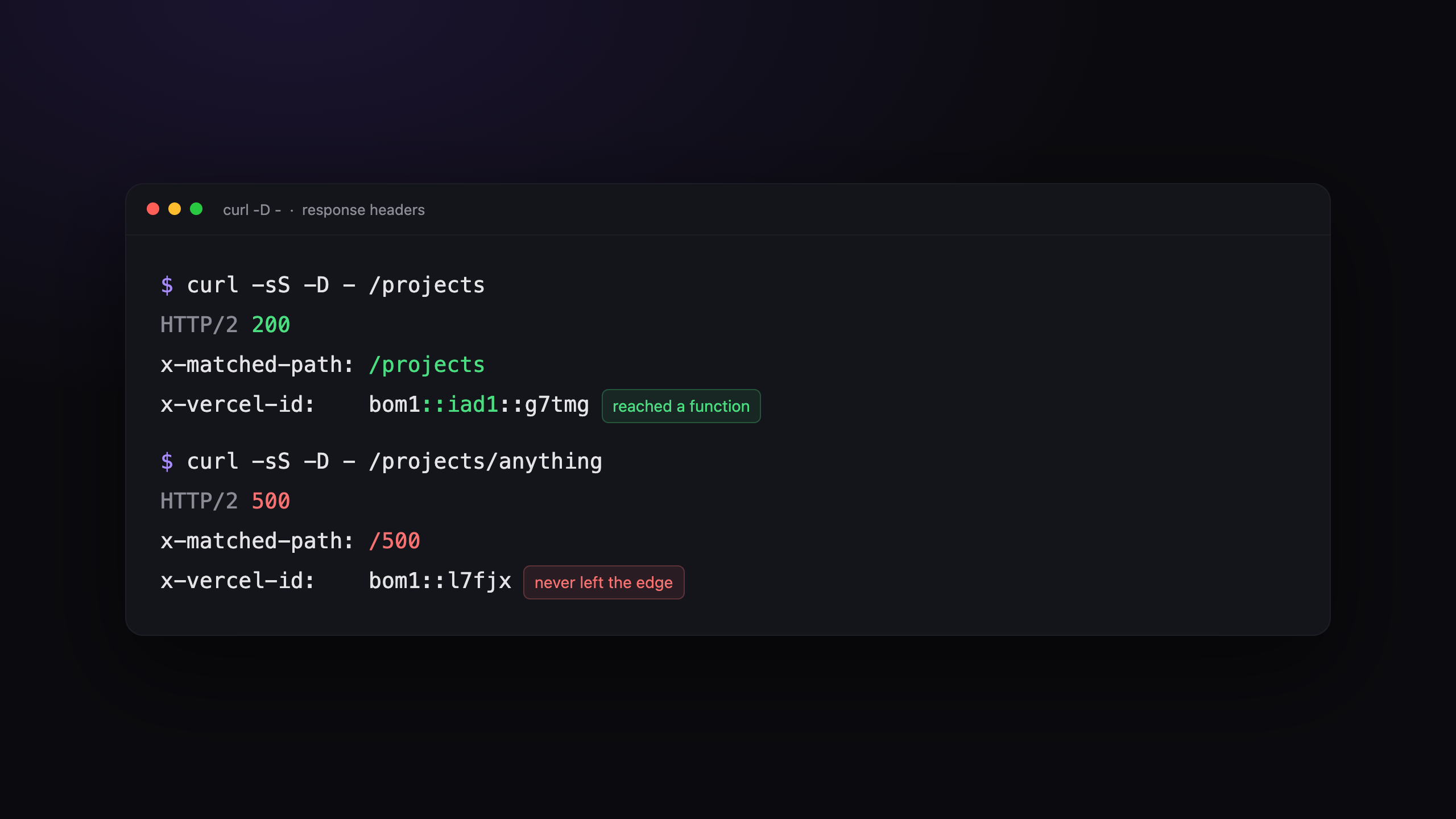
export const dynamic = 'force-dynamic';The bit worth stealing is how I found it. A working route returned x-matched-path: /projects. The broken one returned x-matched-path: /500, and its x-vercel-id showed only the edge region, where working routes showed a second hop into the function region. The request was never reaching a function at all. That took "the page is broken" to "this route has no entry in the build output" in about a minute. curl -D - is deeply unglamorous and it beat an hour of reading my own source code.
10. Editing an environment variable does nothing
Environment changes do not reach deployments that already exist. The redeploy is the step. The edit is not the step, it only feels like the step.
This catches everybody once, usually while attaching a domain: you point DNS at the client, update CLIENT_ORIGIN on the API so CORS will accept the new domain, refresh, and nothing has changed. NEXT_PUBLIC_* variables are worse still, since they are baked into the browser bundle at build time, so those need a rebuild rather than a restart.
What I would tell myself beforehand
Write the platform's constraints into the code, right next to the values they explain. "4, not 5, because a Vercel Function's body is capped at 4.5MB" is the comment that stops future me rounding it up on a Friday. Any number that exists because of a platform limit should say so, or it reads as taste.
Make configuration detectable instead of declared. Keying blob storage off the presence of its own token deleted a whole category of problem, because there is no longer any way to have the switch on and the credential missing.
And assume the silent failure. Four separate problems in this post produced an identical broken image, and not one of them logged a thing. Uploads are especially good at this, because the write and the read are separated by days: the moment it breaks and the moment you notice are nowhere near each other. Checking an upload means reloading the page and looking at what host the URL is on. It does not mean watching the request return 201, which I can tell you from experience is a thing a completely broken upload does very cheerfully.
The full variable tables are in the repo's deploy notes. All of the above is in the commit history too, under considerably less dignified messages.